Numerical Methods (G)
← ChE 555: Applied Mathematics & Modeling for Chemical Engineers
- Successive Substitution Iterative Procedure on EXCEL An example flowsheet with recycle stream. Examine the flowsheet given in the figure at the end of this page. The RED cells are the inputs set by the user. All other cells (values that appear near streams) are calculated by EXCEL according to the formulas entered.
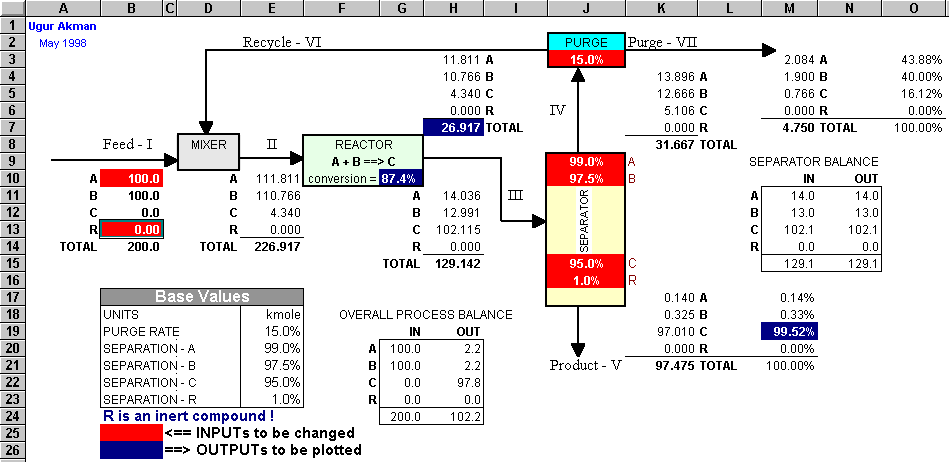
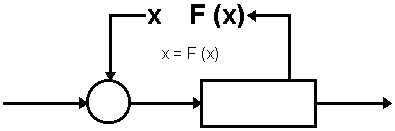 According to the figure on the left, in the flowsheet at the end of this page, the properties of the recycle stream (Stream VI) entering the MIXER are the x values. The properties of the stream (Stream VI) leaving the stream divider (PURGE) are the values calculated by the plant function F(x). Since the MIXER output (Stream II) is calculated based on the properties of the Feed stream (Stream I) and the Recycle stream (Stram VI) there is a Circular Reference among the cells. I.e., EXCEL solves this flowsheet using successive substitution procedure automatically. You can do recycle computations on EXCEL using EXCEL's ability to resolve circular references. For this purpose, first you should set the EXCEL's Calculation Options to allow calculations with circular references. To do this, select OPTIONS from the TOOLS menu. Then, choose the CALCULATIONS dialog pane (see the image below). Check the ITERATIONS option to allow calculation with circular references. Modify the maximum number iterations (Maximum Iterations) and the convergence criterion (Maximum Change) according to your needs. If you uncheck the AUTOMATIC option, then you will have to press the F9 key on your keyboard to start the iterative calculations. In the reactor calculations below, the moles of component A that reacts (moles of A converted to product C) is given by the following emprical relationship: (0.0075∗nA∗nB)/(nR + 0.95) I.e., the rate of reaction depends on the moles of A, B, and the inert compound (R) in the feed to the reactor. As seen on the flowsheet, 1% of R and 95% of C are recovered in the bottoms stream (Stream V) of the Separator. 99% of unreacted A and 97.5% of unreacted B are recovered in the overhead stream (Stream IV) of the separator. 15% of the Stream IV is purged as Stream VII, and thus (100-15)% of Stream IV is recycled to the MIXER where it mixes with the Feed stream. Download the excel file (PLANT2.XLS) to your PC by clicking on the figure, and examine the formulas. Change the Inert amount in the feed stream and observe the changes occurring on the flowsheet (the EXCEL Worksheet). Your second PROJECT will be related to this example!
- Examine the flowsheet given in the figure at the end of this page. The RED cells are the inputs set by the user. All other cells (values that appear near streams) are calculated by EXCEL according to the formulas entered. According to the figure on the left, in the flowsheet at the end of this page, the properties of the recycle stream (Stream VI) entering the MIXER are the x values. The properties of the stream (Stream VI) leaving the stream divider (PURGE) are the values calculated by the plant function F(x). Since the MIXER output (Stream II) is calculated based on the properties of the Feed stream (Stream I) and the Recycle stream (Stram VI) there is a Circular Reference among the cells. I.e., EXCEL solves this flowsheet using successive substitution procedure automatically. You can do recycle computations on EXCEL using EXCEL's ability to resolve circular references. For this purpose, first you should set the EXCEL's Calculation Options to allow calculations with circular references. To do this, select OPTIONS from the TOOLS menu. Then, choose the CALCULATIONS dialog pane (see the image below). Check the ITERATIONS option to allow calculation with circular references. Modify the maximum number iterations (Maximum Iterations) and the convergence criterion (Maximum Change) according to your needs. If you uncheck the AUTOMATIC option, then you will have to press the F9 key on your keyboard to start the iterative calculations. In the reactor calculations below, the moles of component A that reacts (moles of A converted to product C) is given by the following emprical relationship: (0.0075∗nA∗nB)/(nR + 0.95) I.e., the rate of reaction depends on the moles of A, B, and the inert compound (R) in the feed to the reactor. As seen on the flowsheet, 1% of R and 95% of C are recovered in the bottoms stream (Stream V) of the Separator. 99% of unreacted A and 97.5% of unreacted B are recovered in the overhead stream (Stream IV) of the separator. 15% of the Stream IV is purged as Stream VII, and thus (100-15)% of Stream IV is recycled to the MIXER where it mixes with the Feed stream. Download the excel file (PLANT2.XLS) to your PC by clicking on the figure, and examine the formulas. Change the Inert amount in the feed stream and observe the changes occurring on the flowsheet (the EXCEL Worksheet). Your second PROJECT will be related to this example!